Author Topic: Image problem in TinyPTC and it should work  (Read 10931 times)

0 Members and 1 Guest are viewing this topic.

Offline Hotshot

  • DBF Aficionado
  • ******
  • Posts: 2114
  • Karma: 91
    • View Profile
Image problem in TinyPTC and it should work
« on: September 01, 2008 »
hiya all,

Image problem in TinyPTC and it should work. Could anyone explain to me why it doesnt work?


 :cheers:
« Last Edit: September 01, 2008 by Hotshot »

Offline hellfire

  • Sponsor
  • Pentium
  • *******
  • Posts: 1294
  • Karma: 466
    • View Profile
    • my stuff
Re: Image problem in TinyPTC and it should work
« Reply #1 on: September 01, 2008 »
For such an specific problem I suggest visiting a furtuneteller ;)
Challenge Trophies Won:

Offline StatMat

  • C= 64
  • **
  • Posts: 43
  • Karma: 14
    • View Profile
Re: Image problem in TinyPTC and it should work
« Reply #2 on: September 01, 2008 »
My money's on a bug somewhere... :p
"When the only tool you own is a hammer, every problem begins to resemble a nail."

Offline Shockwave

  • good/evil
  • Founder Member
  • DBF Aficionado
  • ********
  • Posts: 17409
  • Karma: 498
  • evil/good
    • View Profile
    • My Homepage
Re: Image problem in TinyPTC and it should work
« Reply #3 on: September 01, 2008 »
If my balls were made of Crystal I'd be happy to answer you Hotshot..
Shockwave ^ Codigos
Challenge Trophies Won:

Offline Hotshot

  • DBF Aficionado
  • ******
  • Posts: 2114
  • Karma: 91
    • View Profile
Re: Image problem in TinyPTC and it should work
« Reply #4 on: September 01, 2008 »
Code: [Select]
        ' Credits to Shockwave
        #define dbfcls redim as integer buffer (800*600)         
        #Include Once "tinyptc.bi"
       
        If( ptc_open( "Putting Picture in TinyPtc.", 800, 600 ) =0 ) Then
            End -1
        End If
   
        option dynamic
       
        Dim Shared As Integer Buffer( 800 * 600 )
        dim shared kk as string           
        Dim myImage As Any Ptr
       
        'Create image buffer
        myImage = Imagecreate(600, 600)       
       
        'Load the image
        Bload Exepath & "pic1.bmp", myImage
       
        DO       
          'Put the image
          Put (150, 150), myImage
                 
        '  wait &H3DA,8
          kk=inkey$
       
          Ptc_update @buffer(0)
          dbfcls
         LOOP until kk=chr$(27)
   
       Ptc_Close()       

       'Destroy the image
       Imagedestroy myImage
       End

Offline Clyde

  • A Little Fuzzy Wuzzy
  • DBF Aficionado
  • ******
  • Posts: 7271
  • Karma: 71
    • View Profile
Re: Image problem in TinyPTC and it should work
« Reply #5 on: September 01, 2008 »
I can tell you one thing that you are doing wrong, from not even running the program. You are mixing the default gfxlib stuff with tinyptc, you need to feed the buffer you use to update the screen with.

1st thing you need to do is load in you image, I'd recommend the routine that either Rbz or Jim did. Have a search for them dude.

2nd thing I'd suggest is to make a sub called DrawImage with your positions, and make sure that the graphic(s) are being put into the buffer for the screen.
« Last Edit: September 01, 2008 by Clyde »
Still Putting The IT Into Gravy
If Only I Knew Then What I Know Now.

Challenge Trophies Won:

Offline Shockwave

  • good/evil
  • Founder Member
  • DBF Aficionado
  • ********
  • Posts: 17409
  • Karma: 498
  • evil/good
    • View Profile
    • My Homepage
Re: Image problem in TinyPTC and it should work
« Reply #6 on: September 01, 2008 »
Yep, what Clyde says.

You can't use freebasic graphics library commands like this.
Drawing an image using tinyptc is not as simple as you might think.

You need to understand that all tinyptc can do is to update a screen from a chunk of memory, so you need to define a buffer to hold your image, a buffer for the screen, load the image into the buffer and then copy the image buffer onto the screen.

Your code is so broken that it's not possible to fix it without re-writing it.

If you post the picture that you want to draw in this thread I'll write the code that does it for you so you can see how it is working.

Hope that helps.
Shockwave ^ Codigos
Challenge Trophies Won:

Offline Xalthorn

  • Amiga 1200
  • ****
  • Posts: 331
  • Karma: 100
    • View Profile
Re: Image problem in TinyPTC and it should work
« Reply #7 on: September 02, 2008 »
I'm in the process of commenting the source for my recent compo entries and they contain image loading and drawing code (BMP loading code courtesy of Jim).  However, I'll have a stab at explaining what you need to be doing.

With tinyptc, you are always drawing into a single array buffer, defined as

Code: [Select]
DIM SHARED AS UINTEGER BUFFER(XRES*YRES)

or something similar.

Everything you do needs to be placed in this buffer.  A basic plot would be

Code: [Select]
BUFFER(YPOS*XRES+XPOS)=VALUE

Drawing an image is slightly more complicated, but only slightly.  First of all, you define another chunk of memory to hold your image.  Let's say that your image is 100x50 pixels in size.

Code: [Select]
DIM SHARED AS UINTEGER MYPIC(100*50)

This is now an empty array of data in the same format as the buffer.  You now need to load your image into this buffer and I would highly recommend Jims code to load an image dynamically at runtime into your buffer, or RBZs code to prepare a data file for direct inclusion into your code at compilation (no need for the MYPIC() definition then as it would be inside the file created by RBZ's tool).

You could even fill the array with data programmatically, for example:

Code: [Select]
FOR Y=0 TO 49
    FOR X=0 TO 99
        MYPIC(Y*XRES+X)=X*2
    NEXT X
NEXT Y

This will fill the picture with a black to blue gradient running from left to right.

Now we have a thrilling picture, we can copy it to the screen.  As suggested, use a routine that will accept parameters.

Code: [Select]
' XP : The X coord of the screen where we want to start drawing the image
' YP : The Y coord of the screen where we want to start drawing the image
' W : The width of the image to draw
' H  : The height of the image to draw
SUB DRAWPIC(byval XP as UINTEGER, byval YP as UINTEGER, byval W as UINTEGER, byval H as UINTEGER)

DIM AS UINTEGER X,Y,XX,YY

' Y runs from 0 to Height-1 because the image array runs from 0-99 and not 1-100
FOR Y=0 TO H-1
    ' same trick with X
    FOR X=0 TO W-1
        ' To keep the code readable, work out where we should be plotting in the
        ' screen buffer
        XX=XP+X
        YY=YP+Y
        BUFFER(YY*XRES+XX)=MYPIC(Y*W+X)
    NEXT X
NEXT Y

END SUB

I'm running this from memory and obviously haven't tested it as it's not a complete program, but you shouldn't have any problems adapting it to your test.

If I should have commented more, or it just plain doesn't work, shout and I'll try again.  I'll also try to get my source code commented ready for submission as soon as possible.
Challenge Trophies Won:

Offline Hotshot

  • DBF Aficionado
  • ******
  • Posts: 2114
  • Karma: 91
    • View Profile
Re: Image problem in TinyPTC and it should work
« Reply #8 on: September 02, 2008 »
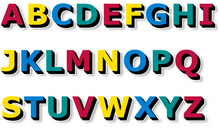
I want to draw the scroller on the screen. The Fonts I have pick out are

Xalthorn:

That was interesting to know. So U have unpack the picture into memory.  I remmy days when I code in amos to unpack the picture to stop people stealing the images in the folder when it nothing there  ;)

 :cheers:

UPDATED :)
« Last Edit: September 02, 2008 by Hotshot »

Offline Clyde

  • A Little Fuzzy Wuzzy
  • DBF Aficionado
  • ******
  • Posts: 7271
  • Karma: 71
    • View Profile
Re: Image problem in TinyPTC and it should work
« Reply #9 on: September 02, 2008 »
I'd strongly recommend that you get a single image drawn to the screen as in your original topic title, and look at the kind peoples replies in helping you out dude. Before you go head first into a bitmap scroller.

Once you've got an image displayed as you want it, then you can start a new topic about bitmap scrollers. Also there is no R in your image; plus I dont think your individual letters are of the same size.
Still Putting The IT Into Gravy
If Only I Knew Then What I Know Now.

Challenge Trophies Won:

Offline Xalthorn

  • Amiga 1200
  • ****
  • Posts: 331
  • Karma: 100
    • View Profile
Re: Image problem in TinyPTC and it should work
« Reply #10 on: September 02, 2008 »
I want to draw the scroller on the screen. The Fonts I have pick out are


Xalthorn:

That was interesting to know. So U have unpack the picture into memory.  I remmy days when I code in amos to unpack the picture to stop people stealing the images in the folder when it nothing there  ;)

 :cheers:

As Clyde has said, there isn't an 'R' in that font, so unless you want to talk like a wascally wabbit, I would recommend grabbing that one as well.

Drawing a bitmap font to the screen is a nice extension from drawing a picture, albeit slightly more complicated.  The first thing I would do though is to place the font all on one row, giving you a very very wide image.

This way, you can read the ascii code for the letter in your scrolltext as follows:

Code: [Select]
C=ASC(SCROLLTEXT,POS)

Subtract an appropriate number to get a scrollimage offset, and then copy a section of the image to the screen.

For example, let us assume that you only intend to use A-Z without any punctuation.  You would get an offset by using:

Code: [Select]
C=ASC(SCROLLTEXT,POS)-65

As the capital letter 'A' is ASCII 65 and if it's the first letter in your image, you want an offset of 0.

Now a quick check to make sure that you can actually draw the thing

Code: [Select]
C=ASC(SCROLLTEXT,POS)-65

IF C>64 THEN
    DRAW_LETTER(XP, YP, C)
END IF

This code trusts that your scrolltext only contains spaces and the letters A-Z.  If you include others, you'll need to extend your scrollfont to include those in the correct ASCII sequence.

Your DRAW_LETTER() routine would be a modified image drawing routine that understands that your image is very wide and will make the appropriate Y*FONTIMAGEWIDTH+X calculation.

In terms of throwing an image to the screen though, this is really running before you've tried walking.  To make sure you don't trip and fall in a huge heap not knowing which leg is which, I would follow Clyde's advice and do the walk first :D

Mainly because what I'm explaining now might appear to be complete gibberish as I'm starting to make assumptions on understanding.
Challenge Trophies Won:

Offline Xalthorn

  • Amiga 1200
  • ****
  • Posts: 331
  • Karma: 100
    • View Profile
Re: Image problem in TinyPTC and it should work
« Reply #11 on: September 02, 2008 »
I want to draw the scroller on the screen. The Fonts I have pick out are


Xalthorn:

That was interesting to know. So U have unpack the picture into memory.  I remmy days when I code in amos to unpack the picture to stop people stealing the images in the folder when it nothing there  ;)

 :cheers:

UPDATED :)

If you use a non-proportional image font, you will also need an array of offsets and widths so that your code knows where each letter starts and how wide it is.  Not to mention that your scroller code will risk falling over itself as it tries to draw them to the screen.  Proportional scrolltexts are not for the faint hearted and certainly not an ideal project for your first bitmap scroller.

Go for something more like your first font, make sure they are all the same width (even if that means padding with white space) and work from there.
Challenge Trophies Won:

Offline Clyde

  • A Little Fuzzy Wuzzy
  • DBF Aficionado
  • ******
  • Posts: 7271
  • Karma: 71
    • View Profile
Re: Image problem in TinyPTC and it should work
« Reply #12 on: September 11, 2008 »
Did you ever get this resolved Hotshot?
Still Putting The IT Into Gravy
If Only I Knew Then What I Know Now.

Challenge Trophies Won:

Offline Hotshot

  • DBF Aficionado
  • ******
  • Posts: 2114
  • Karma: 91
    • View Profile
Re: Image problem in TinyPTC and it should work
« Reply #13 on: September 12, 2008 »
This image fonts is the same size in width and height.  :)


I am using Rbraz code for displaying the image but when I run the program and I get this  ???


Code: [Select]
'-------------------------
' Â .: Bitmap Text :.
'         +
' Â .: Font Loader :.
'
' Â Using Bitmap 256 color
' Â palette image
'
' Â Whithout "DLL"s !!!
'
'-------------------------
'    by Rbraz 2006
'-------------------------

Option Explicit

'Windowed
#define PTC_WIN

'-------------------------------------
' Includes.
'-------------------------------------
#Include Once "tinyptc.bi"

'Screen constants
Const XRES=640          'Screen Width
Const YRES=480          'Screen Height
Const ARES=XRES * YRES  'Array Width

'BitmapFont constants
Const FontW=32  'Font Width
Const FontH=32  'Font Height
Const FontL=26  'Number Of letters in the font

'Sub Routines
Declare Sub Draw_Text(byval message as string, byval xpos as integer, byval ypos as integer, byval inc as integer)
Declare Sub LoadAnimImage( stringFilename As string, byval FrameW, byval FrameH )
Declare Sub DrawImage(byval xpos as integer, byval ypos as integer, byval character as integer, byval FrameW as integer, byval FrameH as integer)
Declare Sub Load_Bitmap(byval filename as string)
Declare Sub ClearScreen()
Declare Sub FPS_Count()

'Variables
Dim Shared Buffer(ARES) as integer  'Tinyptc buffer
Dim Shared BitmapFont( FontW, FontH, FontL ) as integer ' Font buffer

'Bitmap (256 color palette) loader variables
ReDim Shared img_buffer(1) as ubyte                     ' Bitmap Image buffer
Dim Shared img_r(256), img_g(256), img_b(256) as ubyte  ' RGB color palette buffer
Dim Shared img_w, img_h as short                        ' Image Width / Height

'FPS Counter
Dim Shared iFPS, bSettime,iSecStart,iFrameCount,iFrameStart as integer

'Image file name
Dim file_name as string
file_name="Media\BITMAP.bmp"

'Load our bitmap font
LoadAnimImage( file_name,FontW,FontH )
 
'Open TinyPTC window
If( ptc_open( "Bitmap Text + Font Loader", XRES, YRES ) = 0 ) Then
    End -1
End if

'Main Loop
While Inkey$() <> Chr$( 27 )
 
      ClearScreen()
 
      Draw_Text("FPS : "& iFPS,10,10,FontW)
 
      Draw_Text("BITMAP TEXT",132,150,FontW)
      Draw_Text("+",290,190,FontW)
      Draw_Text("FONT LOADER",132,230,FontW)
      Draw_Text("BY RBRAZ - 2006",90,320,FontW) 
 
      FPS_Count()
 
      Ptc_Update @Buffer(0)
Wend

'Close TinyPTC window
ptc_close()


'Draw text on screen
Sub Draw_Text(byval message as string, byval xpos as integer, byval ypos as integer, byval inc as integer)
    Dim a,i as integer
    Dim character as integer
    Dim char as string
    Dim alphatab as string

    For a=1 To Len(message)
        char = Mid$(message,a,1)
        character = Asc(char)-32  'Make sure that your font are into this range
        If (character>-1) And (character<FontL) then
            DrawImage(xpos,ypos,character,FontW,FontH)
        End If
        xpos=xpos+inc
    Next
End Sub

'Load frame images
Sub LoadAnimImage( Filename As string, byval FrameW, byval FrameH )
 Dim intX, intY, FrameWidth, FrameHeight, FrameNum
 Dim rect_x1, rect_x2, rect_y1, rect_y2, a, b
 Dim pixel
 
 'Load bitmap 256 color palette
 Load_Bitmap(Filename)

 FrameWidth   = img_w/FrameW
 FrameHeight  = img_h/FrameH
 
 FrameNum = 0
 rect_x1  = 0
 rect_x2  = FrameW
 rect_y1  = 0
 rect_y2  = FrameH
 
 For b = 0 to FrameHeight-1
     For a = 0 to FrameWidth-1
         For intY = rect_y1 to rect_y2-1
             For intX = rect_x1 to rect_x2-1
                 pixel= img_buffer( intX + ( intY * img_w ) )
                 BitmapFont( intX Mod FrameW, intY Mod FrameH, FrameNum ) = (img_r(pixel) Shl 16) Or (img_g(pixel) Shl 8 ) Or img_b(pixel)
             Next 
         Next
         rect_x1 = rect_x2
         rect_x2 = rect_x2 + FrameW
         FrameNum = FrameNum + 1
     Next 
     rect_x1 = 0
     rect_x2 = FrameW
     rect_y1 = rect_y2
     rect_y2 = rect_y2 + FrameH
 Next   
End Sub

'Draw image into Buffer
Sub DrawImage(byval xpos as integer, byval ypos as integer, byval character as integer, byval FrameW as integer, byval FrameH as integer)
Dim intX, intY As integer

For intY=0 to FrameH-1
    For intX=0 to FrameW-1
        if (xpos+intX) < (XRES - 1) and (xpos+intX) > 0 then
           Buffer( ((intY+ypos) * XRES) + (intX+xpos)) = BitmapFont(intX, intY, character)
        end if
    Next
Next

end sub

'----------------------------------------
' For 256 color palette image only
'----------------------------------------
Sub Load_Bitmap(byval filename as string)
 Dim i,j,n,k,l,cnt as integer
 Dim Bmp_len, file as integer
 Dim byt as ubyte
 
 file = FreeFile
 
 OPEN filename FOR BINARY AS #file

 Get #file,19,img_w  ' bmp width
 Get #file,23,img_h  ' bmp height

 Bmp_len = img_w * img_h   ' Bmp size

 ReDim img_buffer(Bmp_len)
 Dim temp(Bmp_len)

 'Color palette
 cnt = 55
 For i = 0 To 255
     Get #file,cnt,byt
     img_b(i) = byt
     cnt+=1
     Get #file,cnt,byt
     img_g(i) = byt
     cnt+=1
     Get #file,cnt,byt
     img_r(i) = byt
     cnt+=2
 Next

 'Image pixels
 cnt = 1079
 For i = 0 To Bmp_len-1
     Get #file,cnt,byt
     img_buffer(i) = byt
     cnt+=1
 Next
 
 Close #file

 For i = -(Bmp_len-1) To 0
     temp(j) = img_buffer(Abs(i))
     j = j + 1
 Next

 'Flip image
  Do
    For j = 0 To img_w
        k = (j + (n * img_w))
        l = ((img_w - j) + (n * img_w))
        img_buffer(l) = temp(k)
    Next
    n = n + 1
    Loop Until n = img_h

End Sub

Sub ClearScreen() 
 Dim i as integer
 for i = 0 to ARES
     Buffer(i) = 0
 next
End Sub

Sub FPS_Count()
 If bSettime = 1 then
    iSecStart = Timer() * 1000.0
    iFrameStart = iFrameCount
    bSettime = 0
 EndIf
 
 If (Timer()*1000.0) >= iSecStart + 1000 then
    iFPS = iFrameCount - iFrameStart
    bSettime = 1
 EndIf
 iFrameCount = iFrameCount + 1
End Sub

Offline Clyde

  • A Little Fuzzy Wuzzy
  • DBF Aficionado
  • ******
  • Posts: 7271
  • Karma: 71
    • View Profile
Re: Image problem in TinyPTC and it should work
« Reply #14 on: September 12, 2008 »
Havent run your code, but is the bitmap font 256 colours ?
If it's not then I recommend you use a paint program and reduce or increase it to that colour mode.
Still Putting The IT Into Gravy
If Only I Knew Then What I Know Now.

Challenge Trophies Won:

Offline Hotshot

  • DBF Aficionado
  • ******
  • Posts: 2114
  • Karma: 91
    • View Profile
Re: Image problem in TinyPTC and it should work
« Reply #15 on: September 12, 2008 »
Quote
Havent run your code, but is the bitmap font 256 colours ?
If it's not then I recommend you use a paint program and reduce or increase it to that colour mode.

Thank you Clyde, I will try get the 256 Colour mode.

 :cheers:

Offline Rbz

  • Founder Member
  • DBF Aficionado
  • ********
  • Posts: 2757
  • Karma: 493
    • View Profile
    • https://www.rbraz.com/
Re: Image problem in TinyPTC and it should work
« Reply #16 on: September 12, 2008 »
@hotshot: you will need to use a font in ascii sequence, like the one I've attached below...
For this font, change bmp constants to:
Code: [Select]
'BitmapFont const
Const FontW=32 'Font Width
Const FontH=32 'Font Height
Const FontL=60 'Number Of Letters In The Font
Challenge Trophies Won:

Offline Hotshot

  • DBF Aficionado
  • ******
  • Posts: 2114
  • Karma: 91
    • View Profile
Re: Image problem in TinyPTC and it should work
« Reply #17 on: September 16, 2008 »
thank you rbz and I going change your fonts to my home made fonts see what look like. :)

 :cheers:

Offline Hotshot

  • DBF Aficionado
  • ******
  • Posts: 2114
  • Karma: 91
    • View Profile
Re: Image problem in TinyPTC and it should work
« Reply #18 on: September 17, 2008 »
I got your fonts and my fonts working but how do you load background?
And Finally How do you put music in it please?

Code: [Select]
'-------------------------
' Â .: Bitmap Text :.
'         +
' Â .: Font Loader :.
'
' Â Using Bitmap 256 color
' Â palette image
'
' Â Whithout "DLL"s !!!
'
'-------------------------
'    by Rbraz 2006
'-------------------------

Option Explicit

'Windowed
#define PTC_WIN

'-------------------------------------
' Includes.
'-------------------------------------
#Include Once "tinyptc.bi"

'Screen constants
Const XRES=640          'Screen Width
Const YRES=480          'Screen Height
Const ARES=XRES * YRES  'Array Width

'BitmapFont constants
'BitmapFont const
Const FontW=32 'Font Width
Const FontH=32 'Font Height
Const FontL=60 'Number Of Letters In The Font

'Sub Routines
Declare Sub Draw_Text(byval message as string, byval xpos as integer, byval ypos as integer, byval inc as integer)
Declare Sub LoadAnimImage( stringFilename As string, byval FrameW, byval FrameH )
Declare Sub DrawImage(byval xpos as integer, byval ypos as integer, byval character as integer, byval FrameW as integer, byval FrameH as integer)
Declare Sub Load_Bitmap(byval filename as string)
Declare Sub ClearScreen()
Declare Sub FPS_Count()

'Variables
Dim Shared Buffer(ARES) as integer  'Tinyptc buffer
Dim Shared BitmapFont( FontW, FontH, FontL ) as integer ' Font buffer

'Bitmap (256 color palette) loader variables
ReDim Shared img_buffer(1) as ubyte                     ' Bitmap Image buffer
Dim Shared img_r(256), img_g(256), img_b(256) as ubyte  ' RGB color palette buffer
Dim Shared img_w, img_h as short                        ' Image Width / Height

'FPS Counter
Dim Shared iFPS, bSettime,iSecStart,iFrameCount,iFrameStart as integer

'Image file name
Dim file_name  as string
Dim file_name2 as string

file_name="Media\rsigold2.bmp"
file_name2="Media\BACKGROUND.bmp"

' Load Background........................................
Load_Bitmap(file_name2)
' ..............................................................

'Load our bitmap font
LoadAnimImage( file_name,FontW,FontH )
 
'Open TinyPTC window
If( ptc_open( "Bitmap Text + Font Loader", XRES, YRES ) = 0 ) Then
    End -1
End if

'Main Loop
While Inkey$() <> Chr$( 27 )
 
      ClearScreen()

      ' Putting Background image

      drawimage(0, 0,0, file_name2,0)   ' Why Error?

      ' ..............................................................

      Draw_Text("FPS : "& iFPS,10,10,FontW)
 
      Draw_Text("BITMAP TEXT",132,150,FontW)
      Draw_Text("+",290,190,FontW)
      Draw_Text("FONT LOADER",132,230,FontW)
      Draw_Text("BY RBRAZ - 2006",90,320,FontW) 
 
      FPS_Count()
 
      Ptc_Update @Buffer(0)
Wend

'Close TinyPTC window
ptc_close()


'Draw text on screen
Sub Draw_Text(byval message as string, byval xpos as integer, byval ypos as integer, byval inc as integer)
    Dim a,i as integer
    Dim character as integer
    Dim char as string
    Dim alphatab as string

    For a=1 To Len(message)
        char = Mid$(message,a,1)
        character = Asc(char)-32  'Make sure that your font are into this range
        If (character>-1) And (character<FontL) then
            DrawImage(xpos,ypos,character,FontW,FontH)
        End If
        xpos=xpos+inc
    Next
End Sub

'Load frame images
Sub LoadAnimImage( Filename As string, byval FrameW, byval FrameH )
 Dim intX, intY, FrameWidth, FrameHeight, FrameNum
 Dim rect_x1, rect_x2, rect_y1, rect_y2, a, b
 Dim pixel
 
 'Load bitmap 256 color palette
 Load_Bitmap(Filename)

 FrameWidth   = img_w/FrameW
 FrameHeight  = img_h/FrameH
 
 FrameNum = 0
 rect_x1  = 0
 rect_x2  = FrameW
 rect_y1  = 0
 rect_y2  = FrameH
 
 For b = 0 to FrameHeight-1
     For a = 0 to FrameWidth-1
         For intY = rect_y1 to rect_y2-1
             For intX = rect_x1 to rect_x2-1
                 pixel= img_buffer( intX + ( intY * img_w ) )
                 BitmapFont( intX Mod FrameW, intY Mod FrameH, FrameNum ) = (img_r(pixel) Shl 16) Or (img_g(pixel) Shl 8 ) Or img_b(pixel)
             Next 
         Next
         rect_x1 = rect_x2
         rect_x2 = rect_x2 + FrameW
         FrameNum = FrameNum + 1
     Next 
     rect_x1 = 0
     rect_x2 = FrameW
     rect_y1 = rect_y2
     rect_y2 = rect_y2 + FrameH
 Next   
End Sub

'Draw image into Buffer
Sub DrawImage(byval xpos as integer, byval ypos as integer, byval character as integer, byval FrameW as integer, byval FrameH as integer)
Dim intX, intY As integer

For intY=0 to FrameH-1
    For intX=0 to FrameW-1
        if (xpos+intX) < (XRES - 1) and (xpos+intX) > 0 then
           Buffer( ((intY+ypos) * XRES) + (intX+xpos)) = BitmapFont(intX, intY, character)
        end if
    Next
Next

end sub

'----------------------------------------
' For 256 color palette image only
'----------------------------------------
Sub Load_Bitmap(byval filename as string)
 Dim i,j,n,k,l,cnt as integer
 Dim Bmp_len, file as integer
 Dim byt as ubyte
 
 file = FreeFile
 
 OPEN filename FOR BINARY AS #file

 Get #file,19,img_w  ' bmp width
 Get #file,23,img_h  ' bmp height

 Bmp_len = img_w * img_h   ' Bmp size

 ReDim img_buffer(Bmp_len)
 Dim temp(Bmp_len)

 'Color palette
 cnt = 55
 For i = 0 To 255
     Get #file,cnt,byt
     img_b(i) = byt
     cnt+=1
     Get #file,cnt,byt
     img_g(i) = byt
     cnt+=1
     Get #file,cnt,byt
     img_r(i) = byt
     cnt+=2
 Next

 'Image pixels
 cnt = 1079
 For i = 0 To Bmp_len-1
     Get #file,cnt,byt
     img_buffer(i) = byt
     cnt+=1
 Next
 
 Close #file

 For i = -(Bmp_len-1) To 0
     temp(j) = img_buffer(Abs(i))
     j = j + 1
 Next

 'Flip image
  Do
    For j = 0 To img_w
        k = (j + (n * img_w))
        l = ((img_w - j) + (n * img_w))
        img_buffer(l) = temp(k)
    Next
    n = n + 1
    Loop Until n = img_h

End Sub

Sub ClearScreen() 
 Dim i as integer
 for i = 0 to ARES
     Buffer(i) = 0
 next
End Sub

Sub FPS_Count()
 If bSettime = 1 then
    iSecStart = Timer() * 1000.0
    iFrameStart = iFrameCount
    bSettime = 0
 EndIf
 
 If (Timer()*1000.0) >= iSecStart + 1000 then
    iFPS = iFrameCount - iFrameStart
    bSettime = 1
 EndIf
 iFrameCount = iFrameCount + 1
End Sub

 :cheers:

Offline Clyde

  • A Little Fuzzy Wuzzy
  • DBF Aficionado
  • ******
  • Posts: 7271
  • Karma: 71
    • View Profile
Re: Image problem in TinyPTC and it should work
« Reply #19 on: September 17, 2008 »
For the music question you'd be better off making a new topic, and there are lots of different libraries to play music with ;)

For loading a background you will need to make some of your arrays with an added
dimension to it, as at present you have just the one for the bitmap font, and the same for the arrays that hold the red, grn and blu. You will also need to have a DrawImage sub.

Have a see if you can work it out dude, then If you want I can have ago for you if you get stuck.

Cheers,
Clyde.
« Last Edit: September 17, 2008 by Clyde »
Still Putting The IT Into Gravy
If Only I Knew Then What I Know Now.

Challenge Trophies Won: