I want to draw the scroller on the screen. The Fonts I have pick out are
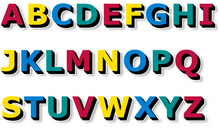
Xalthorn:
That was interesting to know. So U have unpack the picture into memory. I remmy days when I code in amos to unpack the picture to stop people stealing the images in the folder when it nothing there 

As Clyde has said, there isn't an 'R' in that font, so unless you want to talk like a wascally wabbit, I would recommend grabbing that one as well.
Drawing a bitmap font to the screen is a nice extension from drawing a picture, albeit slightly more complicated. The first thing I would do though is to place the font all on one row, giving you a very very wide image.
This way, you can read the ascii code for the letter in your scrolltext as follows:
C=ASC(SCROLLTEXT,POS)
Subtract an appropriate number to get a scrollimage offset, and then copy a section of the image to the screen.
For example, let us assume that you only intend to use A-Z without any punctuation. You would get an offset by using:
C=ASC(SCROLLTEXT,POS)-65
As the capital letter 'A' is ASCII 65 and if it's the first letter in your image, you want an offset of 0.
Now a quick check to make sure that you can actually draw the thing
C=ASC(SCROLLTEXT,POS)-65

IF C>64 THEN
    DRAW_LETTER(XP, YP, C)
END IF
This code trusts that your scrolltext only contains spaces and the letters A-Z. If you include others, you'll need to extend your scrollfont to include those in the correct ASCII sequence.
Your DRAW_LETTER() routine would be a modified image drawing routine that understands that your image is very wide and will make the appropriate Y*FONTIMAGEWIDTH+X calculation.
In terms of throwing an image to the screen though, this is really running before you've tried walking. To make sure you don't trip and fall in a huge heap not knowing which leg is which, I would follow Clyde's advice and do the walk first

Mainly because what I'm explaining now might appear to be complete gibberish as I'm starting to make assumptions on understanding.
