Hi Xetick:
I' am back with probaly some more ideas and improvements for plane9.
When starting the editor, the plane9 windows looks to me a bit like there is something wrong / unfinished or still missing... Sure its not really... but i think the reason for this, is the empty lightblue area in the middle of the screen. So here we start with a probaly first imrprovements which gives plane9 even at start a more looking professional tool, isnt it?
Just take a look how it looks yet when running the app and how it could look like, when having already an empty FlowEdit or FlowChart window...(or however you want name it)
[Click link to see images in full size]
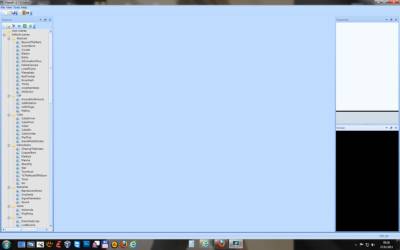 http://www.secretly.de/public/plane9/StartScreen.jpg
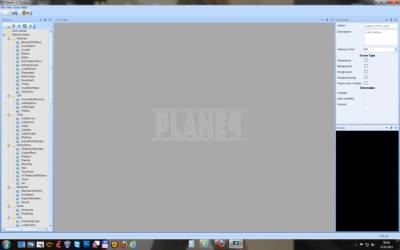 http://www.secretly.de/public/plane9/StartScreenNew1.jpg
So the app starts with empty projects but the user (even for newbies to this tool) see, how to start and how things are ordered. Btw when starting v1.7.0 the properties window apears empty - i changed this in my idea graphics. Adding a new scene could look something like following image:
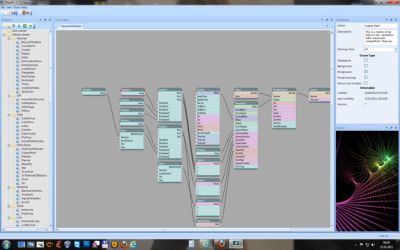 http://www.secretly.de/public/plane9/StartScreenNew2.jpg
Another thing is the MenuBar of the MainWindow. I thought a litle bit and changed the menu structure a little bit, which hopefully is more user friendly.
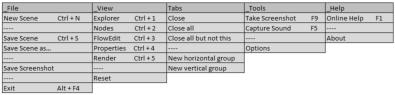 http://www.secretly.de/public/plane9/MenuBar_New.jpgSome ideas and thoughts:
Screenshots:
When using the menu or F9 to take a screenshot,it would be nice to have this even in the Clipboard... Another thing, mabye it makes sence to autosave screenshots (image++) in a seperate "screenshot" folder with a suffix like screenshot_0000.jpg, screenshot_0001.jpg?
FlowChart / FlowEditor Window:
Something i really miss atm, are scrollbars when the tree is bigger as the shown area. So i added scrollbars to the images as idea too.
Capture Sound:
Atm it seems (under Vista/Win7) the app is capturing the background audio of the standard soundcard... So what about a config, where the user can use and select between more as one available soundcards? For example users could have two soundcards (even as external USB soundcard device)
Creating a scene:
If people want to create a scene (like a music video with special visualisations), something like an timeline window would be nice... So the user can compose his viualisation video... In fact of this, it would be nice to select the wanted audiofile (MP3, OGG, WAV etc) - Its just an idea...
Exporting:
Atm the user can save it screenshot... So what about exporing a defined timelenght or timeline-project as video? (this could be really cool i think)
Have a nice day! I really like your tool more and more

[Edited - Added:
Sorry, ofcourse it makes sence to leave the properties window empty/clean on ScreenshowNew1 - when no project is loaded! ^^
