Author Topic: Plane9 v1.7 released  (Read 14671 times)

0 Members and 1 Guest are viewing this topic.

Offline Xetick

  • Atari ST
  • ***
  • Posts: 132
  • Karma: 80
    • View Profile
    • Plane9
Plane9 v1.7 released
« on: February 22, 2011 »
I though I would announce it here first that the next version of Plane9 has been released. 120+ scenes, 60+ nodes, cg shaders, predefined perlin & worly(voroni) noise functions, better blur, lightning bolt node, fluid simulations, post processing effects.. the list goes on. Probably the most important new feature is that the screensaver is sound sensitive on vista & win7. So it will work with just about any play like spotify, iTunes and the rest.

To give a taste of what this latest version can produce here is a little image of most included scenes. Check the editor if you want to see how most shaders works. A lot of them comes from shaders I have found on the net (included with permission)


For more info you can go to the web page plane9

Plane9 - Home of the Plane9 3d screensaver/music visualizer
Challenge Trophies Won:

Offline Kirl

  • Senior Member
  • Pentium
  • ********
  • Posts: 1219
  • Karma: 231
    • View Profile
    • Homepage
Re: Plane9 v1.7 released
« Reply #1 on: February 22, 2011 »
Wildly awesome stuff, dude!  :clap:

I was quite chuffed with my, by comparison rather meak, swirly pattern gen. I should really learn a real language instead of sticking to scripting. Plane9 is the real deal!

Have you thought about moire patterns?
My example is embarrassingly slow, but it serves it's purpose I suppose.
« Last Edit: February 22, 2011 by Kirl »
www.kirl.nl
Challenge Trophies Won:

Offline LittleWhite

  • Senior Member
  • Amiga 1200
  • ********
  • Posts: 418
  • Karma: 31
  • It's me!
    • View Profile
Re: Plane9 v1.7 released
« Reply #2 on: February 22, 2011 »
I have to put an eye on it :) When I will reach a Windows Machine though.
The demoscene will never die, never!

Offline Xetick

  • Atari ST
  • ***
  • Posts: 132
  • Karma: 80
    • View Profile
    • Plane9
Re: Plane9 v1.7 released
« Reply #3 on: February 22, 2011 »
Quote
Have you thought about moire patterns? My example is embarrassingly slow, but it serves it's purpose I suppose.

Really nice moire. I thought about them but haven't actually done any. But doing this is a shader is quite simple and fun to. I got something moire like by starting with the xor scene then replace the pixel shader with this

Code: [Select]
float4 PS_Program(PSInput pi) : COLOR
{
float2 p = -1.0 + 2.0 * pi.tex;
float2 p1 = p-in1.xy;
float v1 = smoothstep(0,0.2,sin(atan(p1.y,p1.x)*200));
float2 p2 = p-in2.xy;
float v2 = smoothstep(0,0.2,sin(atan(p2.y,p2.x)*200));
return float4(min(v1,v2).xxx,1);
}

Its not really good but a start and changing the values and the formula can bring up some fun patterns.

Plane9 - Home of the Plane9 3d screensaver/music visualizer
Challenge Trophies Won:

Offline LittleWhite

  • Senior Member
  • Amiga 1200
  • ********
  • Posts: 418
  • Karma: 31
  • It's me!
    • View Profile
Re: Plane9 v1.7 released
« Reply #4 on: February 23, 2011 »
I have tested a bit ... really cool ... but I am not sure it can interest me (I prefer to have code :D)
Just, can you fix the right click in the main area ... if you are right clicking at the bottom the menu will be half hidden
The demoscene will never die, never!

Offline Xetick

  • Atari ST
  • ***
  • Posts: 132
  • Karma: 80
    • View Profile
    • Plane9
Re: Plane9 v1.7 released
« Reply #5 on: February 23, 2011 »
I have tested a bit ... really cool ... but I am not sure it can interest me (I prefer to have code :D)
Just, can you fix the right click in the main area ... if you are right clicking at the bottom the menu will be half hidden

Thanks for the bug report. I'll add it to the todo list since that is a rather big bummer.

Yes, the program does exists in a bit of a middle ground. Its too difficult for novices to use but too restricted for professionals to use.

For real developers the main use of the visualizer is the shader editor I think. Since if you have an idea you can throw it onto a cube or fullscreen surface in less than 60 seconds to see if it works out. If you then think it does work out you can easily connect some beat to the shader and you have yourself your very own sound sensitive screensaver/music visualizer.
After that just copy the shader to your demo/intro and use it for what you wanted it to from the start.


Plane9 - Home of the Plane9 3d screensaver/music visualizer
Challenge Trophies Won:

Offline Xetick

  • Atari ST
  • ***
  • Posts: 132
  • Karma: 80
    • View Profile
    • Plane9
Re: Plane9 v1.7 released
« Reply #6 on: February 23, 2011 »
Have you thought about moire patterns?

I took another look now and if you like moire patters this is them on overload. It's almost hypnotic and fractal like. Starting with the xor scene I just changed the pixel shader to

Code: [Select]
float4 PS_Program(PSInput pi) : COLOR
{
float2 p = -1.0 + 2.0 * pi.tex;
float2 p1 = p-in1.xy*0.1;
float v1 = smoothstep(0,0.2,sin(atan(p1.y,p1.x)*2500));
float2 p2 = p-in2.xy*0.1;
float v2 = smoothstep(0,0.2,sin(atan(p2.y,p2.x)*2500));
float2 p3 = p-in3.xy*0.1;
float v3 = smoothstep(0,0.2,sin(atan(p3.y,p3.x)*2500));
return float4(_hsv2rgb((v1*v2/v3),v1,0.5),1);
}

So it's 3 circles rotating randomly close to one another. Since the xor scene changes the in1/in2/in3 values based on beat so does this in a rather subtle way. Took about 20 minutes of fiddling to find this. This is why I love shaders!


Whats funny is that there is a pattern that is created by the music that never shows up on the screenshots. I can only assume its created by the motion between frames. It looks like the number 8 in a lot of different sizes.

Plane9 - Home of the Plane9 3d screensaver/music visualizer
Challenge Trophies Won:

Offline LittleWhite

  • Senior Member
  • Amiga 1200
  • ********
  • Posts: 418
  • Karma: 31
  • It's me!
    • View Profile
Re: Plane9 v1.7 released
« Reply #7 on: February 23, 2011 »
For real developers the main use of the visualizer is the shader editor I think. Since if you have an idea you can throw it onto a cube or fullscreen surface in less than 60 seconds to see if it works out. If you then think it does work out you can easily connect some beat to the shader and you have yourself your very own sound sensitive screensaver/music visualizer.
After that just copy the shader to your demo/intro and use it for what you wanted it to from the start.
Totally agree with that :) and I appreciate your tool for this :) But before I was using IQ's Shader Toy (WebGL) since I am doing more OpenGL programs than DirectX.
Of course your soft has advantages compare to Shader Toy :)
But ... about exporting / importing shader code ... this is kind of not totally true, because I have to remap everything in my program (send values to shader ... drawing the shape and so on).
Can we produce .exe with your Plane9 ? (Why is it called 9 ?)
For example (depending on how you did the code) you can have a .exe generator which will embedded the engine + a player of the scene (like a tracker for music, a bit :D)

I didn't test, but maybe by adding more and more object in the same column, some will not be shown because to much at the bottom (or I hape we can scroll the plane).
And why not having the boxes starting to the top left corner instead of right middle... this look a bit strange to me to have half of the screen not use.
(Please, don't be annoyed if the things I have said are completely out of purpose, I didn't test your tool enough longer to see the bugs in application :p)
The demoscene will never die, never!

Offline va!n

  • Pentium
  • *****
  • Posts: 1435
  • Karma: 109
    • View Profile
    • http://www.secretly.de
Re: Plane9 v1.7 released
« Reply #8 on: February 23, 2011 »
@Xetick:
Have d/l latest version! Works very nice here on Win7 x64! Maybe i have some ideas / improvements for the next version.

- Window can be resized (what is nice), but sadly the window cant be maximized by pressing the maximize button. Would be nice to have a maximize window feature ^^

- Tested with two monitors (screen == extended mode), on the left side a 22" at 1680x1050 and on the right side a 17" at 1024x768. Its really cool, that the running effects (preview mode) are splitted on two screens! Sure its not nice to have two monitors with such a big different resolution. So on the left all looks nice... on the right a lot is cutted. So what about an optional option, that the scene fits on two monitors? What i thought is, a) checking for the highest resolution (like in this example 1680x1050) and render this on the left... and rendering the right side temprary for 1680x1050 and resize it down to fit on 1024x768? Its just an idea but i think its not really important nor a great idea.

Best regards and keep on your great work on this nice app :)
- hp EliteBook 8540p, 4 GB RAM, Windows 8.1 x64
- Asus P5Q, Intel Q8200, 6 GB DDR2, Radeon 4870, Windows 8.1 x64
http://www.secretly.de
Challenge Trophies Won:

Offline Xetick

  • Atari ST
  • ***
  • Posts: 132
  • Karma: 80
    • View Profile
    • Plane9
Re: Plane9 v1.7 released
« Reply #9 on: February 23, 2011 »
@LittleWhite:
Yes true, you can't just copy it over, no program can do that be it shadertoy or nvidias fx composer (Well maybe fx composer using cgfx). What you can do is try things quickly and if you see that the idea/shader is sound then you can build all the interface code you would have had to build for nothing if the idea didn't pan out. But if you already have such a framework setup with all the inputs you need where you can just save and instantly reload the shader then I would say the system is good enough.

No there isn't anyway to create a exe with a scene but you can run a specific scene using the command line. Go to the program files\plane9 dir and for example run
Code: [Select]
plane9 -f "[apppath]scenes\nature\fireball.p9s"It will run the scene as if it was in screensaver mode

It's called Plane9 because my other programs started with "plane". Planestate, Planematrix and because plane9.com was about the only domain that was free and short. If you ever try to find a program name you know how painful it is. If you find a good name you can be sure its taken in some way and as Dilberts boss said. "The most important thing is to have a name before the project begins" ;D

You should think of the dags layout as if it processes each node from left to right. Just like you would read text. In other words "Clear->Render Object->Screen". It felt more natural that way. You can scroll around the dag by holding down the middle mouse button or "Ctrl+Left mouse button" if my memory serves me right.

@va!n
I assume you dont mean the main editor window? Since it does have a maximize buttons. Do you mean the render window? If you drag it of from the main docked windows. Since they do indeed miss a maximize button? Just noticed that visual studio do have maximize buttons on those windows also.

Thats something I haven't considered. I have been working on getting the multimonitor system "acceptable" for weeks. Being able to setup the correct projection matrices when spanning multiple monitors with different sizes is difficult at best. The system I cam up with is that the monitors are views as windows into a big screen. If I where to rescale this the aspect would be wrong. But that might be better than getting half the objects cut off. I'll add it to my todo list at least. Thanks!
Plane9 - Home of the Plane9 3d screensaver/music visualizer
Challenge Trophies Won:

Offline va!n

  • Pentium
  • *****
  • Posts: 1435
  • Karma: 109
    • View Profile
    • http://www.secretly.de
Re: Plane9 v1.7 released
« Reply #10 on: February 24, 2011 »
@Xetick:
You are right, i mean the maximize button on the main window (Configuration Window)! Here on my system i cant press the maximize button on the window title, because the maximize button seems to be deactivated. Minimizing and closing buttons are working nice!

Quote
But that might be better than getting half the objects cut off. I'll add it to my todo list at least. Thanks!

Nice to hear, you will add it on your todo list... Btw, it would be nice to have this optional, so the user can select the mode as it is yet and between the new mode ;)

Probaly i have one more ideas/improvements for the Screensaver window and for the Music visualizer window on the ConfigurationWnd. Since this two windows are splitted into three parts (tree, previewscreen, infotext)... It would be really nice, if there would be SplitAreas, so the user can resize the vertical bar between the (tree) and (preview with info text) and horizontal between (preview) and (info text). This would be esp nice, if the user maximize the app and can resize on this way the preview window ^^

PS: Maximize button works nice on the Editor-Window ;)


[Edit - Added]
I really like the posibility that the user can move the windows elements around inside the Editor! What about adding "Reset" to the menubar  "View -> Reset", so the layout will be reseted to the original (first start after installation)

Something i have noticed when played around with the menubar "View" options... The options (showing) are only working, if the user has closed its window-element before... So what about showing/hidding from the menubar? It would be nice to show and hide the elements from the menu and showing a checked/unchecked sign in front of the menuentry, so the user can directly see/know what elements are active/shown and which are not ^^
« Last Edit: February 24, 2011 by va!n »
- hp EliteBook 8540p, 4 GB RAM, Windows 8.1 x64
- Asus P5Q, Intel Q8200, 6 GB DDR2, Radeon 4870, Windows 8.1 x64
http://www.secretly.de
Challenge Trophies Won:

Offline Xetick

  • Atari ST
  • ***
  • Posts: 132
  • Karma: 80
    • View Profile
    • Plane9
Re: Plane9 v1.7 released
« Reply #11 on: February 24, 2011 »
Quote
Nice to hear, you will add it on your todo list... Btw, it would be nice to have this optional, so the user can select the mode as it is yet and between the new mode ;)

A workaround that exists now is to set the visualizer to show the same image on all screens. You do that under settings. It wont span them so you loose that nice effect but all monitors would get a complete image.

Quote
Probaly i have one more ideas/improvements for the Screensaver window and for the Music visualizer window on the ConfigurationWnd. Since this two windows are splitted into three parts (tree, previewscreen, infotext)... It would be really nice, if there would be SplitAreas, so the user can resize the vertical bar between the (tree) and (preview with info text) and horizontal between (preview) and (info text). This would be esp nice, if the user maximize the app and can resize on this way the preview window ^^

I plan to redo the whole configuration windows since I think having different scene lists for screensaver and music is pointless now because the screensaver reacts to music. During that rebuild I'll see if I can't make it more adjustable size wise. The reason for everything being static is that if it is locked and docked in WinForms lingo it's slow. Since WinForms have a tendency to redraw child windows multiple times if you use that feature. But I'll give it a shot.

Quote
I really like the posibility that the user can move the windows elements around inside the Editor! What about adding "Reset" to the menubar  "View -> Reset", so the layout will be reseted to the original (first start after installation)

Added to todo list!

Quote
Something i have noticed when played around with the menubar "View" options... The options (showing) are only working, if the user has closed its window-element before... So what about showing/hidding from the menubar? It would be nice to show and hide the elements from the menu and showing a checked/unchecked sign in front of the menuentry, so the user can directly see/know what elements are active/shown and which are not ^^

This follows visual studios design. They only show windows in the view menu. If you need to close them you click on the close button on that window. I figured they have probably done more UI research than I have so better go with what they do in most cases  :D

Thanks for the feedback!
Plane9 - Home of the Plane9 3d screensaver/music visualizer
Challenge Trophies Won:

Offline va!n

  • Pentium
  • *****
  • Posts: 1435
  • Karma: 109
    • View Profile
    • http://www.secretly.de
Re: Plane9 v1.7 released
« Reply #12 on: February 25, 2011 »
@Xetick:
I have probaly still some more ideas and improvements in mind.

FileTexture1 Operator:
Its nice that the user can select any texture in the properties window but sadly you are wasting a lot of space in the window. So what about having a preview of the selected/used texture - or maybe more userfriendly, just add a ListView where all available textures are listed with a preview as thumbnail? I think this would be a nice feature - esp when having a lot of textures, people dont must search so long to get the wanted texture ^^

[Click link to see images in full size]


http://www.secretly.de/public/plane9/plane9_idea1.jpg


http://www.secretly.de/public/plane9/plane9_idea2.jpg


Input fields for values
Its nice to click in any editbox/texbox and type in the wished numbers. There is one small problem when wanting to type things like the viewport of screen, which is "0 0 1 1"... By the way there is no auto formating and just only one editbox to type all four values in, the user dont have to mistype. So what about splitting such fields, to have one editfield for each value (you can autoformat this too like for float inputs).

Another thing is to play aroung with values, it would be nice to change the values easy and fast by having a numberbox, to add/sub values by clicking by mouse. Here is just an idea, how it could look like:

[Click link to see images in full size]


http://www.secretly.de/public/plane9/plane9_idea3.jpg

Some more ideas and improvement will follow soon... Best regards

Thorsten aka Mr.Vain/Secretly!
« Last Edit: February 25, 2011 by va!n »
- hp EliteBook 8540p, 4 GB RAM, Windows 8.1 x64
- Asus P5Q, Intel Q8200, 6 GB DDR2, Radeon 4870, Windows 8.1 x64
http://www.secretly.de
Challenge Trophies Won:

Offline Xetick

  • Atari ST
  • ***
  • Posts: 132
  • Karma: 80
    • View Profile
    • Plane9
Re: Plane9 v1.7 released
« Reply #13 on: February 25, 2011 »
FileTexture1 Operator:
Its nice that the user can select any texture in the properties window but sadly you are wasting a lot of space in the window. So what about having a preview of the selected/used texture - or maybe more userfriendly, just add a ListView where all available textures are listed with a preview as thumbnail? I think this would be a nice feature - esp when having a lot of textures, people dont must search so long to get the wanted texture ^^

Nice screenshots! I added this to the todo. However the filetexture is something I really dont want. The problem is that they are big. The are in one size only and they are hard to distribute with a scene. The goal is instead that you should create textures dynamically using shaders and render to texture so they can be created in any size and is easy to distribute with the scene.
Currently there isn't a easy way to reuse such a texture but I have plans for a group system also. So you could group a set of nodes together to form a library. But when showing that library such view that you showed would fit perfectly.

Quote
Another thing is to play aroung with values, it would be nice to change the values easy and fast by having a numberbox, to add/sub values by clicking by mouse. Here is just an idea, how it could look like:

There is a inbuilt way to quickly play around with the values. Not that it's easy to find out Wiki ports window section. The way it works is that you click on the label of a value. Then you move the mouse left and right. You can also hold down shift or ctrl to speed up/slow down the rate of change.

This is the reason I dont have this for color. I wanted to find a way to get this to work for multiple fields also. But by looking at your screenshot I can see it would be a great addition without that feature. Onto the todo list it is.

Quote
Some more ideas and improvement will follow soon... Best regards

Great!
Plane9 - Home of the Plane9 3d screensaver/music visualizer
Challenge Trophies Won:

Offline va!n

  • Pentium
  • *****
  • Posts: 1435
  • Karma: 109
    • View Profile
    • http://www.secretly.de
Re: Plane9 v1.7 released
« Reply #14 on: February 27, 2011 »
Hi Xetick:
I' am back with probaly some more ideas and improvements for plane9.

When starting the editor, the plane9 windows looks to me a bit like there is something wrong / unfinished or still missing... Sure its not really... but i think the reason for this, is the empty lightblue area in the middle of the screen. So here we start with a probaly first imrprovements which gives plane9 even at start a more looking professional tool, isnt it?

Just take a look how it looks yet when running the app and how it could look like, when having already an empty FlowEdit or FlowChart window...(or however you want name it)

[Click link to see images in full size]
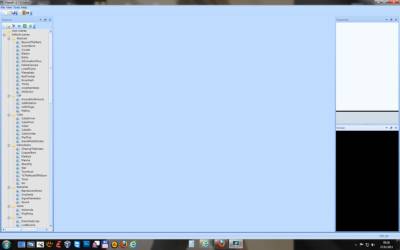

http://www.secretly.de/public/plane9/StartScreen.jpg
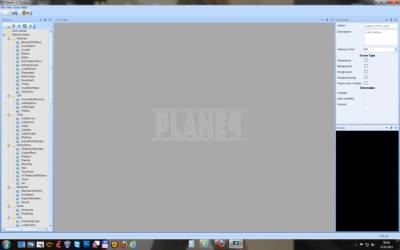

http://www.secretly.de/public/plane9/StartScreenNew1.jpg

So the app starts with empty projects but the user (even for newbies to this tool) see, how to start and how things are ordered. Btw when starting v1.7.0 the properties window apears empty - i changed this in my idea graphics. Adding a new scene could look something like following image:
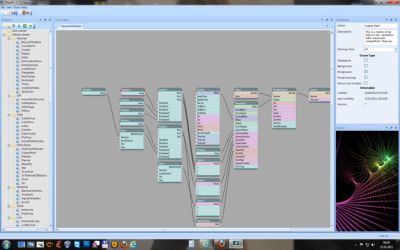

http://www.secretly.de/public/plane9/StartScreenNew2.jpg

Another thing is the MenuBar of the MainWindow. I thought a litle bit and changed the menu structure a little bit, which hopefully is more user friendly.
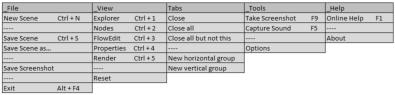

http://www.secretly.de/public/plane9/MenuBar_New.jpg


Some ideas and thoughts:

Screenshots:
When using the menu or F9 to take a screenshot,it would be nice to have this even in the Clipboard... Another thing, mabye it makes sence to autosave screenshots (image++) in a seperate "screenshot" folder with a suffix like  screenshot_0000.jpg, screenshot_0001.jpg?

FlowChart / FlowEditor Window:
Something i really miss atm, are scrollbars when the tree is bigger as the shown area. So i added scrollbars to the images as idea too.

Capture Sound:
Atm it seems (under Vista/Win7) the app is capturing the background audio of the standard soundcard... So what about a config, where the user can use and select between more as one available soundcards? For example users could have two soundcards (even as external USB soundcard device)

Creating a scene:
If people want to create a scene (like a music video with special visualisations), something like an timeline window would be nice... So the user can compose his viualisation video... In fact of this, it would be nice to select the wanted audiofile (MP3, OGG, WAV etc) - Its just an idea...

Exporting:
Atm the user can save it screenshot... So what about exporing a defined timelenght or timeline-project as video? (this could be really cool i think)


Have a nice day! I really like your tool more and more ;)


[Edited - Added:
Sorry, ofcourse it makes sence to leave the properties window empty/clean on ScreenshowNew1 - when no project is loaded! ^^
« Last Edit: February 27, 2011 by va!n »
- hp EliteBook 8540p, 4 GB RAM, Windows 8.1 x64
- Asus P5Q, Intel Q8200, 6 GB DDR2, Radeon 4870, Windows 8.1 x64
http://www.secretly.de
Challenge Trophies Won:

Offline Xetick

  • Atari ST
  • ***
  • Posts: 132
  • Karma: 80
    • View Profile
    • Plane9
Re: Plane9 v1.7 released
« Reply #15 on: February 27, 2011 »
When starting the editor, the plane9 windows looks to me a bit like there is something wrong / unfinished or still missing... Sure its not really... but i think the reason for this, is the empty lightblue area in the middle of the screen. So here we start with a probaly first imrprovements which gives plane9 even at start a more looking professional tool, isnt it?

True, it does look a bit empty. It best that way for when you have used the editor a while but for beginners showing something would be a good idea.
Maybe a "Welcome tab" would be an idea. It would explain a bit about the editor. Have links to online documentation and possible some easy "Create a new project" links and then a option "Dont show this at startup" when you have viewed it enough. I'll add it to the todo list.

Quote
Another thing is the MenuBar of the MainWindow. I thought a litle bit and changed the menu structure a little bit, which hopefully is more user friendly.

I have changed it a bit now and added the capture sound option. Will be included in the next release.

Quote
When using the menu or F9 to take a screenshot,it would be nice to have this even in the Clipboard... Another thing, mabye it makes sence to autosave screenshots (image++) in a seperate "screenshot" folder with a suffix like  screenshot_0000.jpg, screenshot_0001.jpg?

Clipboard thing as been added to todo. Need a way to inform the user about this fact since otherwise they will probably not know. A popup isn't an option since it would be disruptive. I'll see what I can come up with.

The auto screenshot. Do you mean to take a screenshot of every frame shown? Problem is when capturing sound in that case since I can't buffer up the sound and taking a screenshot takes a few ms.

Quote
Something i really miss atm, are scrollbars when the tree is bigger as the shown area. So i added scrollbars to the images as idea too.

Good idea! The plan for the flowchart area is to completely rewrite it and render it using the 3d engine/opengl. So it would be much faster, allow smooth zoom and would allow me to do some other neat tricks. But this is still a good idea even with that rebuild.

Quote
Atm it seems (under Vista/Win7) the app is capturing the background audio of the standard soundcard... So what about a config, where the user can use and select between more as one available soundcards? For example users could have two soundcards (even as external USB soundcard device)

I think they can indirectly do this. I dont have two soundcards in any machine so I can test it. But I capture from the "Default device" as defined by microsoft api so I would guess it's changeable using the normal windows sound mixer. Added it to the todo list never the less.

Quote
If people want to create a scene (like a music video with special visualisations), something like an timeline window would be nice... So the user can compose his viualisation video... In fact of this, it would be nice to select the wanted audiofile (MP3, OGG, WAV etc) - Its just an idea...

That would probably be a application ontop of the existing one so to speak. So you would create your scenes individually but then have a composer type editor where you got to pick different scenes and for how long they should be shown. Added to todo list.

Quote
Atm the user can save it screenshot... So what about exporing a defined timelenght or timeline-project as video? (this could be really cool i think)

Would probably need the scenecomposer tool before there was any use for it since now you only have a single scene.

Quote
Have a nice day! I really like your tool more and more ;)

Nice to hear! If you or anyone keep posting more ideas if they come up
Plane9 - Home of the Plane9 3d screensaver/music visualizer
Challenge Trophies Won:

Offline va!n

  • Pentium
  • *****
  • Posts: 1435
  • Karma: 109
    • View Profile
    • http://www.secretly.de
Re: Plane9 v1.7 released
« Reply #16 on: February 27, 2011 »
@Xetick:
Quote
Clipboard thing as been added to todo. Need a way to inform the user about this fact since otherwise they will probably not know. A popup isn't an option since it would be disruptive. I'll see what I can come up with.

Nice to hear. Just add an option in the Config/OptionWnd, so the user can config, if screenshot should be copied to clipboard too or not (enable/disable), so no need to inform the user and no popup required ^^

The user can config how the "F9 Create Screenshot" should be handled too. For example:

[enable/disable] Auto save screenshot by pressing F9 (F9 = one actually screenshot)
[save path] User can define the path, where the screenshots should be saved to.

Quote
Good idea! The plan for the flowchart area is to completely rewrite it and render it using the 3d engine/opengl. So it would be much faster, allow smooth zoom and would allow me to do some other neat tricks. But this is still a good idea even with that rebuild.

I had the idea for zooming in/out the flowchart and probaly another nice idea too! This feature would be really nice. I have to think again about the other idea i had in mind for the flowchart soon.

Quote
I think they can indirectly do this. I dont have two soundcards in any machine so I can test it. But I capture from the "Default device" as defined by microsoft api so I would guess it's changeable using the normal windows sound mixer. Added it to the todo list never the less.

Ok, you can ofcourse select the default soundcard, when having more as one! But i had mind when for example a VJ want to mix music from two inputs. So two soundcards are required (or a mixer ^^). The idea was, that the user can swap anytime between (all) available sound devices. But this isnt so important atm i think.

Quote
That would probably be a application ontop of the existing one so to speak. So you would create your scenes individually but then have a composer type editor where you got to pick different scenes and for how long they should be shown. Added to todo list.

Yes... i had something in mind, how this could be added and very user friendly... I have to think again about it and let you know.

Some more ideas and improvement will follow
best regards
« Last Edit: February 27, 2011 by va!n »
- hp EliteBook 8540p, 4 GB RAM, Windows 8.1 x64
- Asus P5Q, Intel Q8200, 6 GB DDR2, Radeon 4870, Windows 8.1 x64
http://www.secretly.de
Challenge Trophies Won: